Skip to content
Motionbar
Sign inOpen Motionbar
Motionbar for After Effects · panel

The studio, in your comp.

A panel in After Effects. Make a video or a picture from the frame at the playhead, change the selected layer with the studio’s tools, and every take lands in the comp at the playhead. Your AI app can work in it too.

Version 0.1.19 · After Effects 2026 or newer · Mac and Windows · ZXP
FileCompositionLayerEffectAnimationViewWindowDefaultLearnStandard
Project
Launch spotProduct.movLogo.aiMotionbar
Composition: Launch spot▾
0:00:02:14Full ▾Active Camera ▾+0.0
MotionbarPLUGv0.1.19MCP⚡1,240 · Pay as you go
‹VideoImageAudio
Describe the scene you imagine…
+ ReferenceKling 3.0Generate16:95s720pSound onGenerate⚡7
0:00:02:14Launch spotProduct.movLogo.aiMusic
Live: the frame at the playhead becomes a 5-second shot, then lands in the comp as a new layer. The loop runs on its own.
What it does

Every tool. One panel.

Chat

Ask it to build or change your composition.

It builds in your own After Effects: a title, an animation, a change to what’s selected. You see each step as it works, the frame it checked and what it cost. Ask for a picture, a video or a change to a clip and it makes it with Motionbar: a card shows the price, and nothing is made until you press Make it.

✓Every change is one undo step✓It knows After Effects from basic edits to expert work: editing, compositing and keying, text and motion, expressions, 3D and cameras, tracking, render and export, and scripting✓The model menu has every model: Auto, Free, Claude, GPT, Gemini and more✓Free turns every month; a paid model shows what it held, used and gave back
MotionbarPLUGv0.1.19MCP⚡1,240 · Pay as you go
‹
Chat
Builds in this After Effects · every change is one undo step
HistoryNew
What are we building?

Ask for a title, an animation, or a change to what’s selected. Every change is one undo step.

A 6-second title card: the logo pops in, then “Spring sale” slides up
✦Auto ▾
✓ Say what’s selectedSend ⚡28
Pictures

A picture from the frame at the playhead.

Take the frame at the playhead, the selected layer or a file as the reference, describe what you want, and the picture lands in the comp at the playhead.

✓The real catalog, by model name✓The frame at the playhead, the selected layer or a file on this computer✓Every take lands in the project’s Motionbar folder and on the comp at the playhead
MotionbarPLUGv0.1.19MCP⚡1,240 · Pay as you go
‹VideoImageAudio
What you make shows here, and goes into your composition at the playhead.
Worn oak, warm grain, matte
+ Reference×Nano Banana Pro16:92KGenerate⚡1
Cinema

Write the shot. We film it.

Describe the shot, add a face, a place or a prop, and set it up like a film: genre, era and tempo, the camera’s body, lens and aperture, its moves, the palette and the light.

✓Camera moves in a sequence: the order is the instruction, A then B✓Audio on or off, 4 to 30 seconds, 480p or 720p, any shape✓The price follows the settings; the take lands in your composition at the playhead
MotionbarPLUGv0.1.19MCP⚡1,240 · Pay as you go
‹
Cinema
Write the shot. We film it.
The shot
Describe the shot you want to create...
Referencesa face, a place, a prop
+ Add a reference
Film setup
GenreEpic
EraAutoAuto
TempoAutoAuto
Camera
BodyAutoAuto
LensAutoAuto
ApertureAutoAuto
Direct a camera move1 in sequence
Several moves form a sequence; the order is the instruction: A, then B.
1Drone Orbit↑↓×
+ Add a move
Color palette
PaletteAutoAuto
Lighting
LightAutoAuto
The take
Audio
OnOff
Duration4 s
Resolution
480p720p
Shape
1:13:49:164:316:921:9
Shoot it! ⚡21

The price follows the settings. The take lands in your composition at the playhead.

Marketing

Product shots, ads and UGC from your product.

Pick what to make (a product shot, an ad, a marketplace picture, UGC or motion), a style from the Marketing room with its picture, and the product photo from the frame, the selected layer or a file.
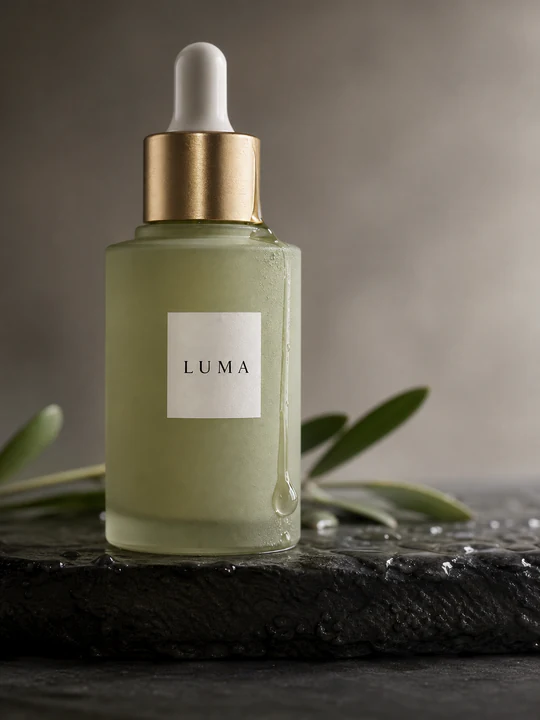
✓Write it writes the words for the style, free✓9:16, 16:9 or 1:1; Graph it! for pictures, Motion it! for videos✓The price follows the settings; the take lands in your composition at the playhead
MotionbarPLUGv0.1.19MCP⚡1,240 · Pay as you go
‹
Marketing
Product shots, ads and UGC from your product.
What to make
Product shotAdsMarketplaceUGCMotion
Catalogue to editorial.
StyleCloseup
CloseupFacelessFull bodyEditorialStudio whiteColor popNatural
Your producta photo of it
+ Add the product photo
The wordsoptional: the style knows what to do
Describe what you want to create...
Write it
The take
Shape
9:1616:91:1
Graph it! ⚡8

One take at a time; the price follows the settings. It lands in your composition at the playhead.

Video

Change the clip on the selected layer.

Pick the selected layer or a file. The screen shows the clip’s name and length, the tool’s settings as chips, and the price on the button before you press it.

✓The selected layer or a file, or drag one in✓Making %, then into your comp, with the model’s reason if it fails✓Tools say Make it ⚡N; Video, Image and Audio say Generate with the price
MotionbarPLUGv0.1.19MCP⚡1,240 · Pay as you go
‹
Remove background
Cut out the subject
Drag & drop or select a videoSelect a clip in the composition, or choose a file.
Selected layerFile…
Output
TransparentGreen screenA colourMask only
Subject
A personAnything
Edges
SoftCrisp

Up to 180 s

Make it ⚡3
Draw to Edit

Brush over the area, then say what goes there.

The clip’s own frame at the playhead, in the clip’s shape. Brush where it should change, say what goes there, and the change runs through the whole clip.

✓Any frame of the clip, with the Frame slider✓Brush size, Undo and Clear✓The take lands in your composition at the playhead
MotionbarPLUGv0.1.19MCP⚡1,240 · Pay as you go
‹
Draw to Edit
Brush over the area, then say what goes there
voice-test-720.mp45.2 s
Selected layerFile…
ModelKling O3 Edit
How
PromptDraw
Brush over the areathen say what goes there
Frame 0:01.5 · brush over the area to change
Frame
BrushUndoClear
What goes there
e.g. a brass lamp on the table
ReferencesUp to 50 pictures or sound+ Add
Pictures of what it should look like, or a sound to follow.
Quality
720p1080p2K
Sound
OnOff

Up to 15 s · 720 to 3840 px

Make it ⚡10
On the selected layer

The studio’s tools, in one panel.

Edit with words, extend, upscale, cut out, reframe, relight, change voice, translate and more. Last generations has every take across Motionbar; a click puts one in your composition.

✓Remove silences finds the pauses (Loose, Medium or Tight) and cuts them from the layer, as one undo step✓Face mesh: a mesh and tracking points as nulls on the layer, made on your computer✓Both are free: nothing leaves your computer
MotionbarPLUGv0.1.19MCP⚡1,240 · Pay as you go
Last generations
Your takes across Motionbar · a click puts one in your composition
+PictureVideoVideoPictureVideoPicturePictureVideoPicture
✦♡▶♥◩♡♪♡◉♡◈♡
Motion Control

A picture of who, a video of how they move.

Pick the character’s picture and a driving video. Kling 3.0 Motion Control and Motion Control Pro take up to 10 seconds; H3 Max Recast takes up to 30 and follows the video’s people, keeping its sound. The take lands in the comp.

✓The frame at the playhead, the selected layer or a file✓Facing from the picture or from the video✓Keep the video’s own sound, or not
MotionbarPLUGv0.1.19MCP⚡1,240 · Pay as you go
‹
Motion Control
A picture of who, a video of how they move.
CharacterA clear picture of who it is.
+ Add
Driving videoThe motion to copy · up to 10 s
+ Add
ModelKling 3.0 Motion Control
Facing
From the pictureFrom the video
Keep the video’s own sound
OnOff
Words
Optional · e.g. keep the red jacket, a quiet studio behind
Generate ⚡9

Every tool in the panel

Create

ChatNEWAsk it to build or change your composition
Video generation52 MODELSWords, pictures or clips to video, with every video model by its real name. The take lands in your comp.
Image generationPictures from words and references
Audio generationSongs and scores: a Song from one prompt, or a Score from words and a length (3 seconds to 10 minutes, MP3 or WAV).
CinemaWrite the shot. We film it.
MarketingProduct shots, ads and UGC from your product

Edit

Edit with wordsMake targeted changes
Draw to EditBrush over the area, then say what goes there
ExtendAdd what happens next, or before
Upscale & restoreSharper, cleaner, bigger
Remove backgroundCut out the subject
Remove an objectErase anything by naming it
ReframeAny format, subject kept

Scene

RelightChange the light and the time of day
Motion ControlA picture of who, a video of how they move. Kling 3.0 Motion Control, Kling 3.0 Motion Control Pro or H3 Max Recast.

Audio

TranslateYour video in another language
Add soundSound effects or music from the picture
Clean up soundClean the voice, or split the tracks
Change voiceReplace the speaker's voice
Remove silencesFREECut the pauses, made hereFree, made on your computer: nothing leaves it.

Only on Motionbar

Tools you won’t find in other panels.
Replace a personONLY HERESwap who’s in the shot
FPS boostONLY HERESmoother, or slow motion
SDR to HDRONLY HEREBrighter, deeper colour
Depth mapONLY HEREDepth for compositing
Mask by wordsONLY HEREA mask of anything you name
Face meshFREEA face mesh and tracking points, made hereFree, made on your computer: nothing leaves it.

AI apps

Connect your AI appClaude, ChatGPT and Codex work in After Effects
How to install

Three steps, two minutes.

After Effects 2026 or newer · Mac and Windows
motionbar-plug-ae-0.1.19-mac.pkg7.6 MB · Mac
1Download the panelFor Mac and Windows. The installer puts the panel into After Effects for you.
FileCompositionLayerEffectAnimationViewWindowHelp
2Open the panelIn After Effects: Window › Extensions › Motionbar.
MOTIONBARFOR AFTER EFFECTS

Generate, edit, reframe and finish video, all inside After Effects. And let Claude, ChatGPT or Codex work in it.

Sign in with Motionbar

You'll finish signing in in your browser.

3Sign in with MotionbarThe browser opens once; the panel picks it up. Your balance shows in its header.
Use it from your AI app

Claude, ChatGPT or Codex can drive your comp.

Open Connect from the panel’s MCP chip, turn Motionbar Plug on, connect the app once and ask it for a change. Everything it does shows in What your AI did; every change is one undo step.

Your AI app gets 74 tools: 67 that work in After Effects (compositions, layers, keyframes, expressions, text, shapes, masks, effects and frames), and 7 more that make pictures, video, changes to a clip and cut-outs with Motionbar, or run After Effects code for anything else. Plus 18 know-how guides, from basic edits to expert work.

1In the panel, open Connect from the MCP chip and turn Motionbar Plug on.
2Open Claude › Settings › Connectors › Add custom connector.
3Paste the link below as the server URL and name it Motionbar Plug.
4Open a chat and ask: “Look at my After Effects composition.”
https://plug.motionbar.ai/mcp
Free to install.The panel is free to install. Face mesh and Remove silences run on your computer and cost nothing. Everything else uses credits from your Motionbar plan, shown in ⚡ on the button before anything is made.See the plans →
Questions

Before you install.

The panel is free to install. Face mesh and Remove silences run on your computer and cost nothing. Everything else uses credits from your Motionbar plan, shown in ⚡ on the button before anything is made.

Your next shot is one frame away.

Download for Mac Version 0.1.19 · After Effects 2026 or newer · also for Blender →